この記事を作った動機
デフォルトがPXEブートになっているPCがあり、CMOSクリアを何かしらの事情ですると、いちいちネットワークブートからしようとして真面目にうざいということがあった。そこで、PXEブートについて都合の良い環境を構築しようと思っていたものの、正直めっちゃめんどくさそうでに感じてかなり長いこと放置していたため、いい加減取り組もうということになった。
私はほとんどこの話題に関しては初見でよく分かっていなかったので、まずはUEFI以前のPCにおいて、pxelinuxまでたどり着くことを目標とした。とりあえず LLM に設定をある程度要件を渡して提案させ、分かる範囲で間違っている部分を公式ドキュメントなどを参考に修正しながら、Kea に DHCP の “Options” なるものを設定してみた。
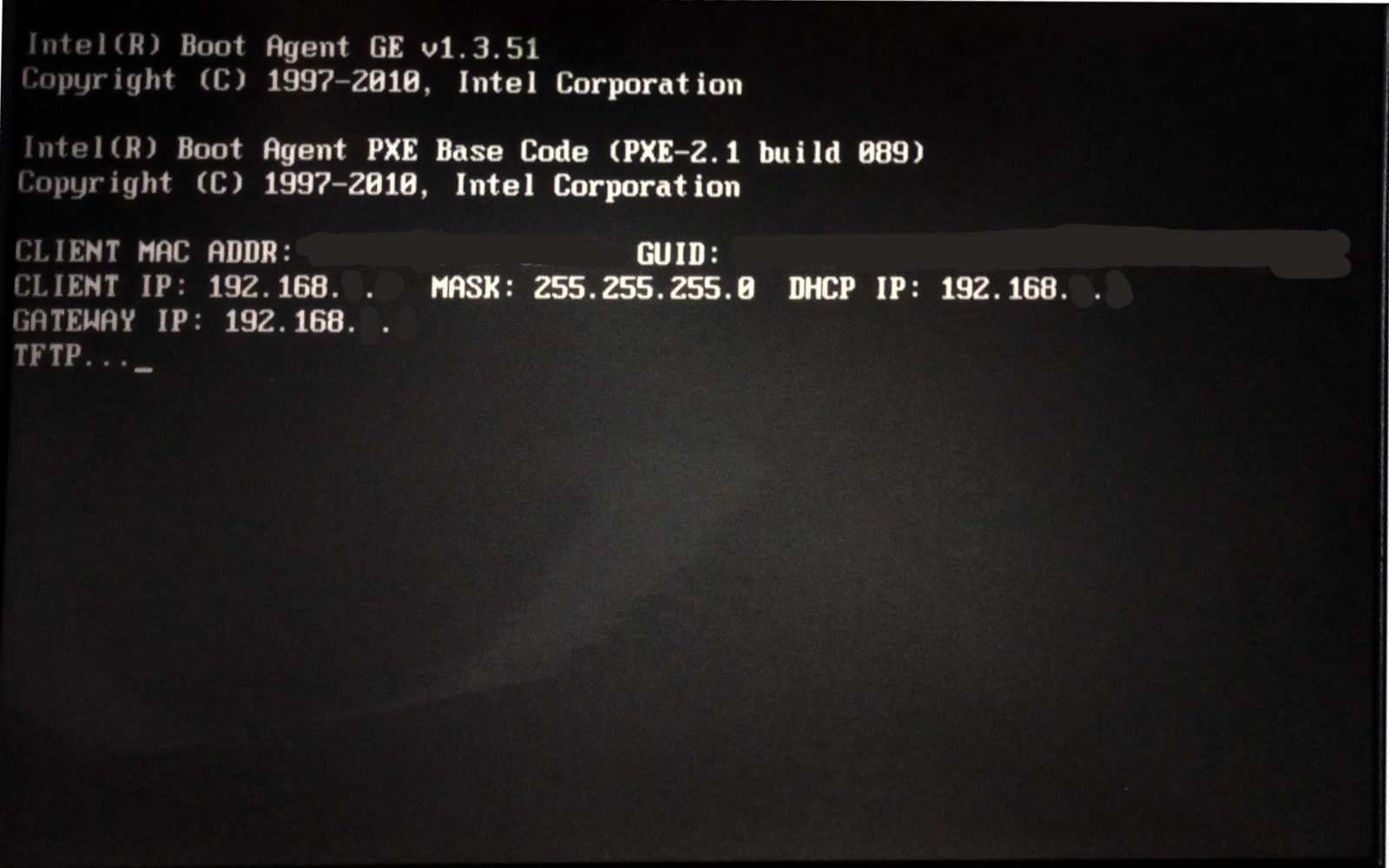
そのところ、DHCP をPCが起動時に認識して、IPアドレスを取得したり正しくゲートウェイを認識したりはしたものの、“TFTP….“となってその後にTimeoutとなる挙動が繰り返されることとなった。用意しておいた TFTP サーバー自体は動いているものの tcpdump によって調べたところ、意図した TFTP サーバーに到達しておらず、DHCP サーバーをTFTP サーバーとして使おうとしている様子が観測された。
このことから、まだ現状では目的の達成には至っていないものの、マイルストーンとしてのpxelinuxを起動するところまではできたため、トラブルシュートで参照したサイトやったことなどに関して記録をまとめておきたい。
前提条件
- DHCP サーバーには、kea を使っている
- DHCP サーバーは、PXEブートで使う TFTP サーバーとは別のPCで独立して動いている
- Arch Linux
- DHCP と TFTP(UDP/69ポート) をホストするサーバー両方において、Firewall の設定(ポート開放)が適切にされていること。
- TFTP となるサーバのIPを
192.168.aa.ccとする
手法に関すること
TFTP をホストする
yay -Sy uftpd
sudo uftpd -n -o ftp=0,tftp=69 ./PXE

# tftp RRQ 'pxelinux.0' from 192.168.aa.dd:2070
# tftp RRQ 'pxelinux.0' from 192.168.aa.dd:2071
# tftp RRQ 'ldlinux.c32' from 192.168.aa.dd:49152
# tftp RRQ 'pxelinux.0' from 192.168.aa.dd:2070
# tftp RRQ 'pxelinux.0' from 192.168.aa.dd:2071
# tftp RRQ 'ldlinux.c32' from 192.168.aa.dd:49152
Kea を設定する(詰まったこと)
Kea の設定で難しいところがあった。TFTP のサーバーを指定するための next-server の指定に苦労した。結局のところネットで調べて、ようやく動いたという感じであった。また、LLM は間違った出力しかせず、Keaのドキュメントを参考資料として与えても改善が見られなかった。
option-dataの項目には、tftp-server-nameですでに TFTP サーバーの IP を指定しているがそれと、boot-file-nameを指定しているだけでは DHCP サーバー自体を TFTP サーバとしてみなしているっぽく、上手く動かなかった。kea の起動時において、エラーこそ出なかったもののtftp-server-nameの項目は意図した通り反映されているか怪しいように見受けられた。
結局のところネットから引っ張ってきたclient-classesという項目が効果的であった。完全なコピペであり、next-serverの項目のIPとBootファイル名だけ自分の環境に書き換えたところ、意図した TFTP サーバーにアクセスするようになった。
LLM 箱の問題に対して、next-serverの項目に以下のように書くことを出力してきたが、実験してみたところ kea が起動時にそのようなオプションは無いとして起動を拒絶するということになったので、間違っているか、古いバージョンの記述が出力されているように見受けられた。
            {
                "name": "next-server",
                "data": "192.168.aa.cc"
            }
本来の正しい設定
{
    "Dhcp4": {
        // 設定が続く ...
        "option-data": [
            {
                "name": "tftp-server-name",
                "data": "192.168.aa.cc"
            },
            {
                "name": "boot-file-name",
                "data": "pxelinux.0"
            }
        ],
        "client-classes": [
            {
                "name": "pxe_bios_x86",
                "test": "substring(option[60].hex,0,9) == 'PXEClient' and option[93].hex == 0x0000",
                "next-server": "192.168.aa.cc",
                "boot-file-name": "pxelinux.0"
            }
        ]
    }
}
LLM が出力した間違った設定
{
    "Dhcp4": {
        // 設定が続く ...
        "option-data": [
            {
                "name": "tftp-server-name",
                "data": "192.168.1.9"
            },
            {
                "name": "boot-file-name",
                "data": "pxelinux.0"
            },
            {
                "name": "next-server",
                "data": "192.168.1.9"
            }
        ]
    }
}
参照したほうが良さそうな資料
-
- Client Classification — Kea 3.3.4-git documentation
https://kea.readthedocs.io/en/latest/arm/classify.html#built-in-client-classes (2026年11月3日)
- Client Classification — Kea 3.3.4-git documentation
- [Kea-users] KEA and pxeboot
https://lists.isc.org/pipermail/kea-users/2022-February/003353.html (2026年11月3日) - [Kea-users] Adding pxe with uefi
https://lists.isc.org/pipermail/kea-users/2023-February/003870.html (2026年11月3日)
トラブルシューティング
tcpdump を使った TFTP の動作確認
DHCP サーバーとなる PC と TFTP(UDP/69ポート) をホストしている PC の2つにおいて、以下のコマンドを実行する。以下は、TFTP アクセスがあった場合の例を示している。もし、PXEブートにおいて、TFTPアクセスがない場合、“00:22:11.814465 eno1 In IP 192.168.aa.bb.58863 > 192.168.aa.cc.69: TFTP, length 24, RRQ “shellx64.efi” netascii"のような表記が出てこない状態となる。
sudo tcpdump -i any udp port 69 -nn

# tcpdump: WARNING: any: That device doesn't support promiscuous mode
# (Promiscuous mode not supported on the "any" device)
# tcpdump: verbose output suppressed, use -v[v]... for full protocol decode
# listening on any, link-type LINUX_SLL2 (Linux cooked v2), snapshot length 262144 bytes
# 00:22:11.814465 eno1  In  IP 192.168.aa.bb.58863 > 192.168.aa.cc.69: TFTP, length 24, RRQ "shellx64.efi" netascii
# 00:22:11.827404 eno1  Out IP 192.168.aa.cc.69 > 192.168.aa.bb.58863: TFTP, length 516, DATA block 1
# 00:22:11.827746 eno1  In  IP 192.168.aa.bb.58863 > 192.168.aa.cc.69: TFTP, length 4, ACK block 1
# 00:22:11.827831 eno1  Out IP 192.168.aa.cc.69 > 192.168.aa.bb.58863: TFTP, length 516, DATA block 2
# 00:22:11.828124 eno1  In  IP 192.168.aa.bb.58863 > 192.168.aa.cc.69: TFTP, length 4, ACK block 2
# 00:22:11.828206 eno1  Out IP 192.168.aa.cc.69 > 192.168.aa.bb.58863: TFTP, length 516, DATA block 3
# 00:22:11.828501 eno1  In  IP 192.168.aa.bb.58863 > 192.168.aa.cc.69: TFTP, length 4, ACK block 3
# 00:22:11.828541 eno1  Out IP 192.168.aa.cc.69 > 192.168.aa.bb.58863: TFTP, length 516, DATA block 4
# 00:22:11.828706 eno1  In  IP 192.168.aa.bb.58863 > 192.168.aa.cc.69: TFTP, length 4, ACK block 4
引用メモ
- [Kea-users] Adding pxe with uefi
https://lists.isc.org/pipermail/kea-users/2023-February/003870.html (2026年11月3日)
[…]
    "client-classes":
    [
      { "name": "XClient_iPXE", "test": "substring(option[77].hex,0,4) == 'iPXE'", "boot-file-name": "http://192.168.10.4/ipxe/boot.ipxe" },
      { "name": "UEFI-32-2",    "test": "substring(option[60].hex,0,20) == 'PXEClient:Arch:00002'", "boot-file-name": "ipxe/i386/ipxe.efi",   "next-server": "192.168.10.4" },
      { "name": "UEFI-32-6",    "test": "substring(option[60].hex,0,20) == 'PXEClient:Arch:00006'", "boot-file-name": "ipxe/i386/ipxe.efi",   "next-server": "192.168.10.4" },
      { "name": "UEFI-64-7",    "test": "substring(option[60].hex,0,20) == 'PXEClient:Arch:00007'", "boot-file-name": "ipxe/x86_64/ipxe.efi", "next-server": "192.168.10.4" },
      { "name": "UEFI-64-8",    "test": "substring(option[60].hex,0,20) == 'PXEClient:Arch:00008'", "boot-file-name": "ipxe/x86_64/ipxe.efi", "next-server": "192.168.10.4" },
      { "name": "UEFI-64-9",    "test": "substring(option[60].hex,0,20) == 'PXEClient:Arch:00009'", "boot-file-name": "ipxe/x86_64/ipxe.efi", "next-server": "192.168.10.4" },
      { "name": "Legacy",       "test": "substring(option[60].hex,0,20) == 'PXEClient:Arch:00000'", "boot-file-name": "ipxe/undionly.kipxe",  "next-server": "192.168.10.4" }
    ],
[…]
参考にしたサイトとか
- Configuration Examples — Kea 3.3.1 documentation
https://kea.readthedocs.io/en/kea-3.3.1/config-examples.html (2026年11月3日) - What is the status of KEA PXE booting?
https://forum.opnsense.org/index.php?topic=51685.0 (2026年11月3日) - KEA DHCP issue with PXE boot using FOG | Netgate Forum
https://forum.netgate.com/topic/187406/kea-dhcp-issue-with-pxe-boot-using-fog/2 (2026年11月3日) - Netgate Adds Kea DHCP to pfSense Plus Software Version 23.09
https://www.netgate.com/blog/netgate-adds-kea-dhcp-to-pfsense-plus-software-version-23.09-1 (2026年11月3日) - Kea Flow Diagrams — Kea 3.3.4-git documentation
https://kea.readthedocs.io/en/latest/umls.html#dhcpv4-special-case-of-double-booting (2026年11月3日) - SUSE Linux Enterprise Server 16.0でのPXEブートサーバの設定 | SUSE Linux Enterprise Server 16.0
https://documentation.suse.com/ja-jp/sles/16.0/html/SLES-PXE-server/ (2026年11月3日) - Preboot Execution Environment - ArchWiki
https://wiki.archlinux.org/title/Preboot_Execution_Environment (2026年11月3日) - TFTP - ArchWiki
https://wiki.archlinux.org/title/TFTP (2026年11月3日) - 7.2. ネットワークブート用の DHCPv4 サーバーの設定 | RHEL の自動インストール | Red Hat Enterprise Linux | 10 | Red Hat Documentation
https://docs.redhat.com/ja/documentation/red_hat_enterprise_linux/10/html/automatically_installing_rhel/configuring-the-dhcpv4-server-for-network-boot_pxe-installation (2026年11月3日) - KEA DHCP PXE boot | Netgate Forum
https://forum.netgate.com/topic/200249/kea-dhcp-pxe-boot/3 (2026年11月3日) -
- The DHCPv4 Server — Kea 1.8.0-git documentation
https://kea.readthedocs.io/en/kea-1.8.0/arm/dhcp4-srv.html (2026年11月3日)
- The DHCPv4 Server — Kea 1.8.0-git documentation
- socket — Low-level networking interface — Python 3.15.2 documentation
https://docs.python.org/3/library/socket.html (2026年11月3日) - AUR (en) - uftpd
https://aur.archlinux.org/packages/uftpd (2026年11月3日) - [Kea-users] KEA and pxeboot
https://lists.isc.org/pipermail/kea-users/2022-February/003353.html (2026年11月3日) -
- Client Classification — Kea 3.3.4-git documentation
https://kea.readthedocs.io/en/latest/arm/classify.html#built-in-client-classes (2026年11月3日)
- Client Classification — Kea 3.3.4-git documentation
- ローカルLLM (Gemma4-31B) (2026年11月3日)
- [Kea-users] Adding pxe with uefi
https://lists.isc.org/pipermail/kea-users/2023-February/003870.html (2026年11月3日)