この記事を作った動機
2025/12/25 から、2026/1/8 に至るまでの間で OneNote 代替に関して、実装をするなど研究を進めているうちにわかったことなどを簡易的に記録する。
動作の様子
TODOs
2026/1/8 になる間やる項目たち。やりきれなかった分は次に持ち越し。 内部構造を説明する図とかドキュメントを作る OverlayWindow において、リサイズやサイズ制限をオプションで付ける。デフォルトでは無効にして、とりあえず selector においてそれが機能するようにする。 全体的な未保存、保存、バッファーの管理について考える pageType などは現状のままで、増やさず、free と markdown に専念する tasks -> jobs で定期的に実行されるバックエンドの関数群において、pageCleaner.py を実装する。各ノートにある、参照が消され、deleted.json に記録されていて、一定期間たったページを時期が来たら本当にファイルシステム上から削除する実装をする。コード自体は、tasks.py の設定に依存し、現状では10秒ごとに消す時が来ていないかポーリングする簡易的な実装である。 再接続機能が正しく機能しない場合を検証するTODOs
メイン(持ち越し、新規混合)
useDatabaseStoreをuseNetworkStoreに名前を変更する。send関数をuseDatabaseStore(useNetworkStore)内にあるものに置き換え、旧来のsend関数の実装を廃止する。createPage.tsxの実装で、ページタイプを取得するとネットワーク周りがバグってリクエストした履歴が消えない結果、未接続の状態として判定されてしまうというバグを何とかする。
propertiesとは独立して、commonsの一部として実装する。padStartcommonsが正しく色を更新できないバグを何とかする。
updatePageの割り込みがあった時に、どのページがセーブされたかIDをUUIDをデータとして含めるupdatePageがあったら差分を扱えるように、先にセーブされたデータをバッファーにためるようにして、diffをマージできるようにするupdatePageコマンドのUUID検証ロジックについて正しく機能しているか調べる。
前回からの持ち越し
持ち越し分
except asyncio.CancelledError が usernameLoop 内で機能していない可能性について調べる。opening handshake failed
Traceback (most recent call last):
File "C:\Users\username\AppData\Roaming\Python\Python312\site-packages\websockets\http11.py", line 138, in parse
request_line = yield from parse_line(read_line)
^^^^^^^^^^^^^^^^^^^^^^^^^^^^^^^^
File "C:\Users\username\AppData\Roaming\Python\Python312\site-packages\websockets\http11.py", line 309, in parse_line
line = yield from read_line(MAX_LINE_LENGTH)
^^^^^^^^^^^^^^^^^^^^^^^^^^^^^^^^^^^^^
File "C:\Users\username\AppData\Roaming\Python\Python312\site-packages\websockets\streams.py", line 46, in read_line
raise EOFError(f"stream ends after {p} bytes, before end of line")
EOFError: stream ends after 0 bytes, before end of line
The above exception was the direct cause of the following exception:
Traceback (most recent call last):
File "C:\Users\username\AppData\Roaming\Python\Python312\site-packages\websockets\server.py", line 545, in parse
request = yield from Request.parse(
^^^^^^^^^^^^^^^^^^^^^^^^^
File "C:\Users\username\AppData\Roaming\Python\Python312\site-packages\websockets\http11.py", line 140, in parse
raise EOFError("connection closed while reading HTTP request line") from exc
EOFError: connection closed while reading HTTP request line
The above exception was the direct cause of the following exception:
Traceback (most recent call last):
File "C:\Users\username\AppData\Roaming\Python\Python312\site-packages\websockets\asyncio\server.py", line 356, in conn_handler
await connection.handshake(
File "C:\Users\username\AppData\Roaming\Python\Python312\site-packages\websockets\asyncio\server.py", line 207, in handshake
raise self.protocol.handshake_exc
websockets.exceptions.InvalidMessage: did not receive a valid HTTP request
他の事項
やったことの詳細
DataServer バックエンドに helper 関数を追加
DataServerが送ったメッセージJSONやフロントエンドから受け取ったJSONメッセージが無秩序に汚い文字列として表示されていたので、それを共通できれいに整形してコンソールに表示する共通の実装として、showJSONMessageを書いた。
# TODO: write document for this function
# NOTE: reveived JSONstring, all command and interrupt JSONstring have to be shown by this function
# arg:
#   JSONstring  : JSON string got received from the connected frontend or will be sent to the frontend.
#   receive     : To show received JSON message, make this arg True otherwise the JSONstring will be shown as a sent JSONstring to the frontend.
# return value
#   Nothing
def showJSONMessage(JSONstring:str,receive:bool=False):
    jsondata = json.loads(JSONstring)
    if(receive):
        print("<<<\n" + json.dumps(jsondata,indent=4))
    else:
        print(">>>\n" + json.dumps(jsondata,indent=4))
改修前のJSONログの例
----------------------
<<<{"command":"info","UUID":"f68e7884-9ce9-4d5d-a778-e2bfc4662fe5","data":null}
findNotes helper: /home/username/work/OneNoteAlternative/firstPrototype/backend/dataServer/notebookData/fsっdfsdfsdfsd does not include a notebook.
{'name': 'test', 'createDate': '2025/12/15', 'updateDate': '2025/12/21', 'id': 'ae7a5760-8a48-4721-9489-63379333f16e', 'pages': ['default.md', 'test.json', 'aaaaa.md'], 'files': []}
findNotes helper: /home/username/work/OneNoteAlternative/firstPrototype/backend/dataServer/notebookData/newnote does not include a notebook.
>>> {"responseType": "commandResponse", "status": "ok", "UUID": "f68e7884-9ce9-4d5d-a778-e2bfc4662fe5", "command": "info", "errorMessage": "nothing", "data": {"test": {"name": "test", "createDate": "2025/12/15", "updateDate": "2025/12/21", "id": "ae7a5760-8a48-4721-9489-63379333f16e", "pages": ["default.md", "test.json", "aaaaa.md"], "files": []}}}
改修後のJSONログの例
----------------------
<<<
{
    "command": "info",
    "UUID": "acaa84de-39f3-46e2-9ae2-313497473e8a",
    "data": null
}
findNotes helper: /home/username/work/OneNoteAlternative/firstPrototype/backend/dataServer/notebookData/fsっdfsdfsdfsd does not include a notebook.
{'name': 'test', 'createDate': '2025/12/15', 'updateDate': '2025/12/21', 'id': 'ae7a5760-8a48-4721-9489-63379333f16e', 'pages': ['default.md', 'test.json', 'aaaaa.md'], 'files': []}
findNotes helper: /home/username/work/OneNoteAlternative/firstPrototype/backend/dataServer/notebookData/newnote does not include a notebook.
>>>
{
    "responseType": "commandResponse",
    "status": "ok",
    "UUID": "acaa84de-39f3-46e2-9ae2-313497473e8a",
    "command": "info",
    "errorMessage": "nothing",
    "data": {
        "test": {
            "name": "test",
            "createDate": "2025/12/15",
            "updateDate": "2025/12/21",
            "id": "ae7a5760-8a48-4721-9489-63379333f16e",
            "pages": [
                "default.md",
                "test.json",
                "aaaaa.md"
            ],
            "files": []
        }
    }
}
時間を表示する文字列を0でパディングするようにした。
# arg:
#   None    : None
# return value
#   OK      : formated date string
#   Error   : None
def timeString():
    currentTime     = time.localtime()
    return "{:04d}/{:02d}/{:02d}".format(
        currentTime.tm_year,
        currentTime.tm_mon,
        currentTime.tm_mday
    )
import time

def showPingMessage():
    print("observe scheduled task")
    print("{:04d}/{:02d}/{:02d} {:02d}:{:02d}:{:02d}".format(
        time.localtime().tm_year,
        time.localtime().tm_mon,
        time.localtime().tm_mday,
        time.localtime().tm_hour,
        time.localtime().tm_min,
        time.localtime().tm_sec
    ))
    print()
showPingMessage Job のスクリプトをリファクタした
実装があまり適当すぎて何度も関数を呼び出すようになっていたので、変数に結果をまとめてその結果を利用して情報を表示するように修正した。
修正前
import time

def showPingMessage():
    print("observe scheduled task")
    print("{:04d}/{:02d}/{:02d} {:02d}:{:02d}:{:02d}".format(
        time.localtime().tm_year,
        time.localtime().tm_mon,
        time.localtime().tm_mday,
        time.localtime().tm_hour,
        time.localtime().tm_min,
        time.localtime().tm_sec
    ))
    print()
修正後
import time

def showPingMessage():
    print("observe scheduled task")
    current = time.localtime()
    print("{:04d}/{:02d}/{:02d} {:02d}:{:02d}:{:02d}".format(
        current.tm_year,
        current.tm_mon,
        current.tm_mday,
        current.tm_hour,
        current.tm_min,
        current.tm_sec
    ))
    print()
フロントエンドをちょっとだけ修正
enum的なことができることが分かり、影響が小さいところからリファクタをちょっとだけした。
変更前の例 (src/modules/MainUI/UIparts/messageBox.tsx)
...
export interface aMessageBox{
    title   : string,
    message : string,
    type    : string, // 直接何でも文字列が入っていしまうため、バグの温床になる。
    UUID    : string
}
...
変更後の例 (src/modules/MainUI/UIparts/messageBox.tsx)
...
export interface aMessageBox{
    title   : string,
    message : string,
    type    : "error" | "ok" | "warning" | "info",
    UUID    : string
}
...
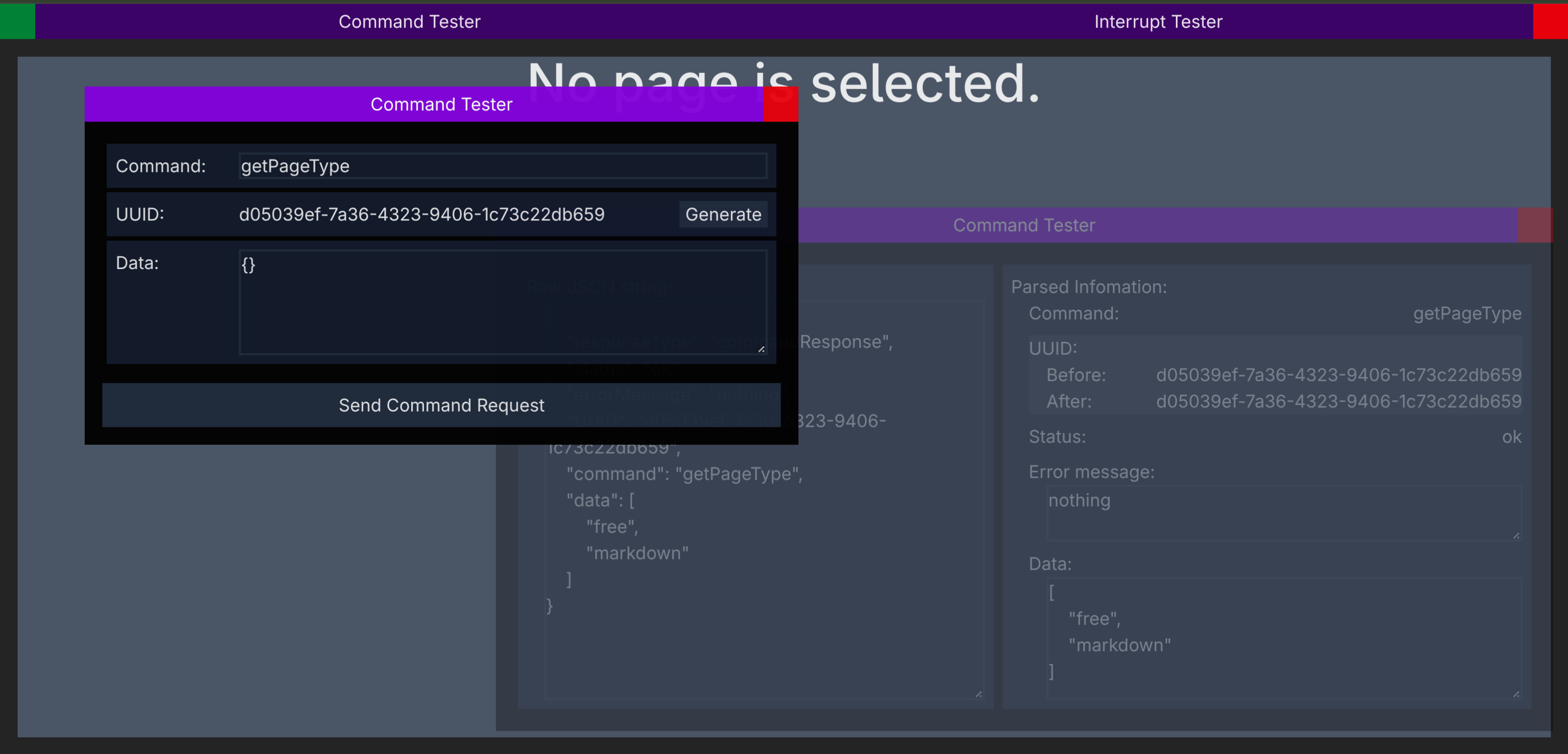
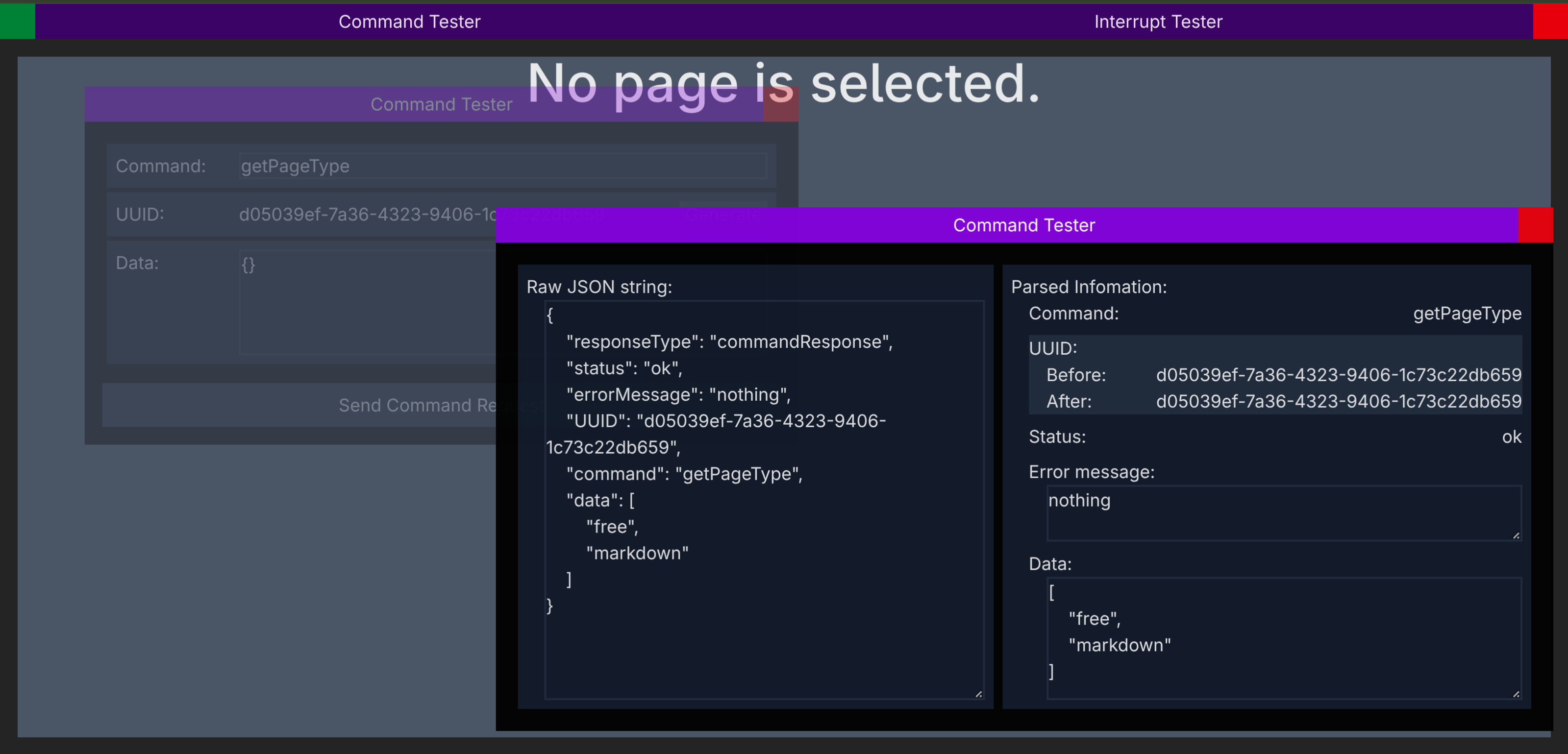
フロントエンドにコマンドテスターを追加した
手動でコマンド要求を作り、どんな応答が帰ってくるかテストできるようにした。
フロントエンドにおいて、旧来の実装のnetwork.tsxにあるsend関数の廃止
すべてのコマンド要求をする部分を、useNetworkStore内部のsend関数に置き換え、旧来のsend関数はコメントアウトして利用できないようにし、廃止した。
卒論を書いた
- ページについて具体的な説明を書いた
- ページの削除について具体的な説明を書いた。
- コマンドと割り込みについて、通信という視点から、どのように動作するのか書いた。
- 図表番号や頭文字の調整を行った。図表のスタイルもなるべく統一する方向性とした。
- フロントエンドが、JSONのコマンド要求をDataServerに送るまでの間にある再送ロジックなどについて図を作り、説明を書いた。
- アーキテクチャの変遷について考察に書いた。
- ページの削除機能について変遷を考察に書いた。
- UnixTimeとYYYY/MM/DDの表現形式を比べて、UnixTimeが実装としては都合が良いことについて、考察に書いた。
- 添付ファイルについて、考察の部分を書き足した。
- 使ったツールの章において、その経緯を校正し、新しく書き直した。
参考にしたサイトとか
- PyFormat: Using % and .format() for great good!
https://pyformat.info/ (2026年1月1日)